variable
printing
|
|
You can print at extremely
high-speed on
|

|
|
PrintChef's
variable data and image substitution capabilities were the first in the
industry-- having been introduced in 1992 with LaserMerge (PrintChef's
predecessor). And, PrintChef's variable data and image substitution is the
fastest in the industry, easily beating other $4,000, $5,000, and $20,000
packages by a factor of two. This helps reduce an 80,000 page print from 1
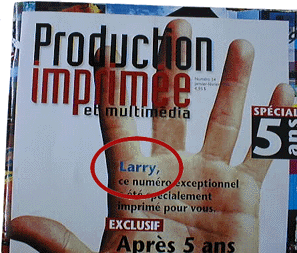
week to under 15 hours. PrintChef's variable data printing is good for both big and little jobs, so you can use it at home to mail out those church socials, or in the office to mail out those stockholder reports. Imagine changing the name printed on a magazine cover for each subscriber... PrintChef did this in the Quebec magazine "Production Imprimee".
|
|
Notice how the name "Larry" is substituted over the background picture of the hand as a high-speed image substitution... |
|
 How does PrintChef do variable printing? |
PrintChef has
three main mechanisms for the variable printing process:
These mechanisms work differently, but give
PrintChef the most control over the variable data & image substitution
process. |
|
Text Substitution |
PrintChef's text
objects cannot only produce static text, but it can include commands that
are substituted at print-time. Among the many commands, is database
commands that are capable of pulling in up to 100 fields from a database
record. If you create a text box that contains database field commands, then PrintChef will request a database at print-time, read that database, and substitute each field command with its appropriate field. When this is combined with the proper erasing area, each page is generated by first erasing the area under the text, reading the database to construct the text object, and then sending that text to the printer. This reduces the printing to merely sending the changing text to the printer. |
|
Image Substitution |
PrintChef can
perform image subtitution by ID, or by reading the text in a field to open
the specified file. This allows PrintChef to work with existing database
constructs while also allowing it to use the more flexible database
management of its image list manager. PrintChef's image list manager allows you to access files by ID, making the database more flexible. You can then specify a database list of IDs that associate IDs to images. This allows you to select an ID translation list at print-time to change out an entire list of images in one simple step. Another advantage of the PrintChef image list manager, is that the images can be stored at a PostScript printer and referenced from the image list at print-time. This can make printing extremely fast because the images are already at the printer. |
|
Erasing Blocks |
PrintChef's
erasing blocks can be used to obliterate a changing area prior to that
block being generated by the application that is printing. This means that
you use your favorite database program to layout the blocks of changing
text, but let PrintChef take care of erasing the area from one page to the
next. |
|
|
|
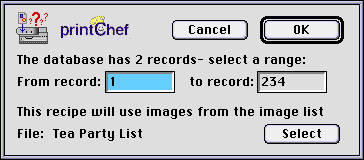
Once you have
created a PrintChef printing style that has database text fields or an image
substitution field, the following dialog appears whenever you try to
print. This dialog shows the number of records in the chosen database
file, and the chosen image list to use when image substitution is being
performed. You can select the range of database records to print, and even which list of images to use for substitution.
|