|

Binding Method
Dialog
|
|
PrintChef can make all
forms of booklets, from calendars, flip books, steno pads, to standard
booklets-- for any size page on paper that you can design (in PrintChef of
course).
PrintChef's automatic booklets are great when you want to generate a
booklet from the web, but sometimes you need absolute control over how a
booklet is laid out...
...In this case, PrintChef allows you to design your own booklet layouts,
specify exact page size, paper size and orientation, multiple parts,
multiple copies of a booklet on a single sheet of paper, and even the
amount of "page creep".
And with PrintChef's proprietary "page creep" adjustments, every
page in your stapled booklets will know just how much to shift so that
outside lines up with the inside.
|
Designing
a
Booklet is Simple
|
|
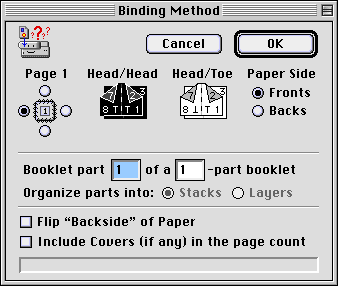
- The 'Page 1' binding specifies on
which of four sides the binding will appear.
- The page orientation can be
upright (Head/Head; standard book) or flipped (Head/Toe; calendar
format).
- The 'Paper Side' indicates whether the
booklet object represents the front or the back of the paper in a
booklet.
- You can break your booklet into a
maximum of 8-parts per paper (this saves paper but make sure you have
a cutter).
- Booklet 'parts' (if chosen) can be
printed as stacks (standard cut and then fold), or as layers
(imposition fold and then cut).
- Choose automatically flip the back side
at print-time to adjust for the way your printer feeds paper.
- And because PrintChef can create up to 2
covers per print job, you can incorporate those covers in the booklet
layout (great for wrap-around images on the cover).
|
Unlimited Booklet
Printing
|
|
- To design booklets, add two
"Booklet Objects", one for the front side of the paper and
one for the back.
- For each "Booklet Object"
specify the proper binding, orientation, and side, and whether PrintChef
covers are included.
- You can even specify a paper type so
that outer pages will creep to compensate for saddle stitching.
- The feast of booklet options, multi-up
booklet options, and paper control make booklet making a dream.
|